
Spilled on Your MacBook? Stop. Don't Turn It On.
The worst thing you can do after a spill is try to power it on. Bring it in immediately.
Most spills are a cleaning job, not a new board.
1719 W North Ave, Wicker Park · Mon–Sat 10am–5:30pm · Walk-ins welcome
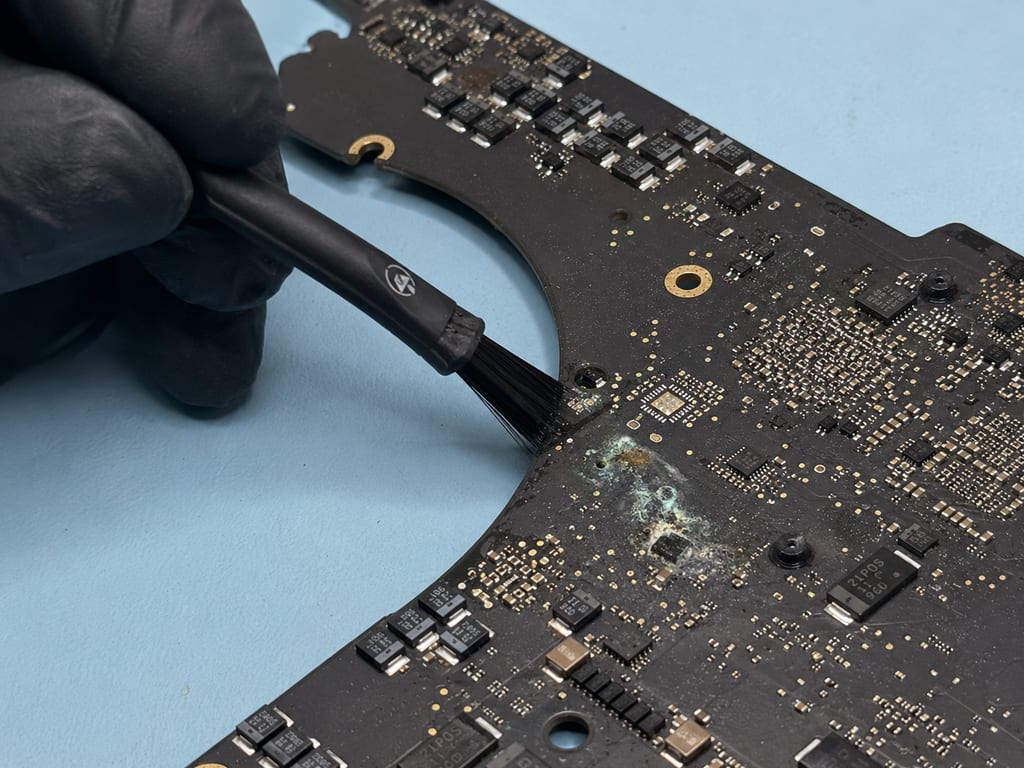
What Happens When Liquid Gets In
If it just happened: don't power it on, and don't try to dry it out for days. Every hour the liquid sits inside, corrosion spreads to more of the board. The sooner it's in, the more we can save.
Liquid doesn't always destroy the board the moment it lands. Most of the damage comes from powering the machine on while it's still wet, which lets the liquid short across components that would otherwise have been fine. Speed is the whole game. The faster the board is cleaned, the better the outcome, and most liquid damage is repairable when it's caught early.
Apple's "liquid damage voids your warranty" is true, but it does not mean the machine can't be repaired. Those are two different things. We assess what the liquid actually reached, what it corroded, and what needs to be addressed before anything is powered on safely.
Severe liquid damage doesn't fail in one neat spot. It spreads across multiple components, and liquid damage is many faults, not one. Each shorted line has to be found before any of it can be powered on. That's where the thermal camera comes in, so we can map every line the liquid reached instead of guessing. The work itself is ultrasonic cleaning to lift the corrosion, corrosion removal and treatment on what's left, and component-level triage on whatever the liquid took out.
Real case
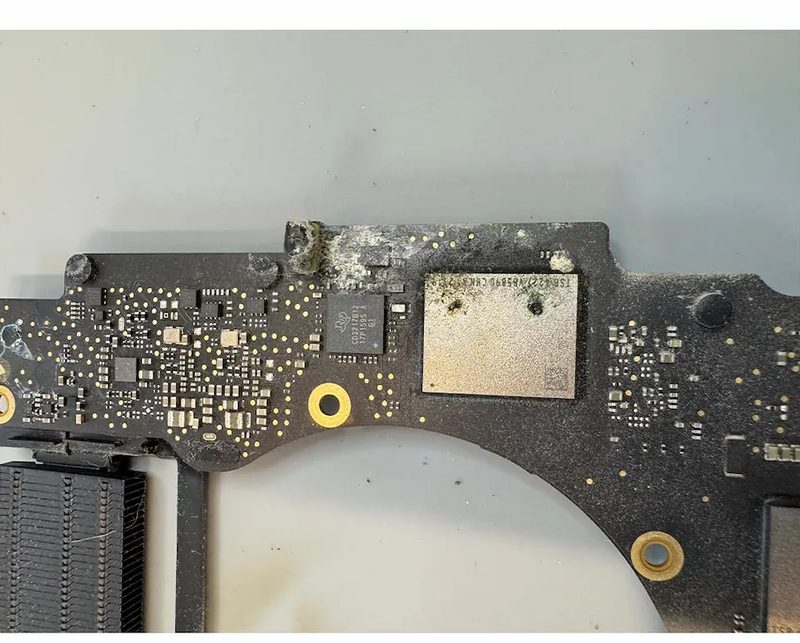
One customer brought in a MacBook after a water-bottle spill in their bag. They had tried drying it out themselves for several days first, which gave the corrosion time to spread across the board. We cleaned the corrosion and replaced the components the liquid had damaged, and had the machine running again. The drying-out wait is the part that costs people. Don't make it.
What the $100 Assessment Covers
Why liquid is $100, not the standard $80
A liquid damage assessment takes more time than a standard board-level diagnostic. We disassemble the machine, clean and inspect the board, and map every line the liquid shorted before anything gets powered on. That's why it's $100 where our standard logic board diagnostic is $80. The $100 applies toward whatever repair work follows, so it isn't an extra cost on top of the repair.
What you get back is a full quote and a straight answer. We tell you what the liquid reached, what it'll take to fix, and what it costs. You decide before any further work begins. No surprises, no work you didn't approve.
What We Do That Apple Won't
When Apple sees liquid damage indicators, they quote a full board replacement. That's their policy, not an assessment of what actually failed. Authorized repair runs on whole-assembly swaps and ships the machine out, because component-level work takes specialized skill and equipment. In many cases liquid damage is a cleaning job and one or two components, not an entire board.
We open it, map the damage, and fix the parts that failed. We repair around 85% of the board-level machines that come in. The other 15% are damage too severe to be worth it, and when that's the case we tell you straight rather than charge you for a repair that won't hold.
For the board-level side of this work, see our MacBook logic board repair page.
Real case
A MacBook came in that wouldn't boot after a liquid spill, and Apple had said it couldn't be repaired. We traced the damage, rebuilt the corroded connections on the board, and brought the machine back.
Your Data After a Spill
If the board hasn't shorted completely, your files are most likely still there, and component repair keeps your original board in the machine so the data stays with it, where a full replacement would lose it. If your files are the whole reason you're here, our MacBook data recovery page walks through how recovery after a spill works.
What to Expect
-
Bring it in immediately
Do not power it on. The sooner it's on the bench, the less corrosion has spread. Walk in, no appointment.
-
$100 assessment, 2 to 3 business days
We disassemble the machine and map what the liquid reached. The fee applies toward your repair.
-
Full quote, you decide
You see the exact cost and timeline before any repair work begins.
-
Repair and return
Repair is an additional 2 to 4 business days, up to about a week for complex damage. We don't do same-day on board-level liquid work, and we contact you when it's ready.
Board-level repairs typically carry a 30 to 90 day warranty on parts and labor. Coverage is confirmed at the time of service based on the nature of the repair.
Getting Here
We're at 1719 W North Ave in Wicker Park, the same location since 2011. We see customers from across Wicker Park and Lincoln Park, and plenty who come up from the Loop and South Loop. A short walk from the Damen Blue Line, or a quick drive off the Kennedy at the North Ave exit, with parking that's usually open right out front. Walk in Monday through Saturday, 10 AM to 5:30 PM, no appointment. If you just spilled, the sooner it's in, the more we can save.
Real Repairs From Our Bench
Chicago Has Trusted eRepair Since 2011
"I spilled water on my MacBook Pro and was panicking because people online say there's no other way other than getting a new one. It turned out the water didn't reach the chip and logic board, and he carefully dried everything."
Mengdi H. · Google review
"Zero complaints, fair pricing, super helpful, highly recommend. Fixed my Mac liquid spill in a day."
T. D. · Google review
Over 15 years of board-level repair experience in Wicker Park, featured in Martha Stewart, U.S. News, and Illinois PIRG.
Liquid Damage Questions
- Don't turn it on. If it's already on, shut it down. Unplug it, leave it powered off, and bring it in as fast as you can. Don't try to dry it out for days. Every hour the liquid sits inside, corrosion spreads to more of the board. The sooner we can clean it, the more we can save. Walk in any day we're open, no appointment needed.
- Maybe, but it doesn't mean you're in the clear. Liquid damage is often delayed. Corrosion builds over days and can take out components that worked fine right after the spill. Have it assessed even if it seems normal now. Powering it on again while liquid is still inside is what turns a cleaning job into a board repair.
- No. Warranty coverage and repairability are two different things. Liquid damage can void Apple's warranty and still be a completely fixable machine. We assess the actual damage, what the liquid reached and what it corroded, not the policy. In many cases liquid damage is a cleaning job and one or two components, not a dead machine.
- It starts with a $100 assessment that applies toward any repair work. From there, the cost depends on what the liquid reached and what it damaged. Some jobs are cleaning and a single component. Others involve more extensive board work. We won't know until we look, and we'll always give you the full cost before we start. Apple quotes a full board replacement on liquid damage by default. We quote the actual repair.
- The assessment takes 2 to 3 business days, because mapping liquid damage is measurement work, not a quick look. If you approve the repair, that's an additional 2 to 4 business days, up to about a week for complex damage. We don't do same-day on board-level liquid work. We give you the exact timeline once we've seen what the liquid reached.
- Usually, yes. If the board hasn't shorted completely, your files are likely still intact. Component-level repair preserves your original board and brings the data back with it. A full board replacement is what destroys it. If your files are the priority, see our MacBook data recovery page for how recovery after a spill works.
- Ultrasonic cleaning uses high-frequency sound waves in a special bath to lift corrosion and contaminants off the board and its components without damaging them. It reaches places a brush or swab can't. It's the same process professional labs use, and it's a core part of how we treat liquid damage before any component work begins.
- Board-level repairs typically carry a 30 to 90 day warranty on parts and labor. Coverage is confirmed at the time of service based on the nature of the repair. Liquid damage is board-level work, so the repair falls under that window. We'll go over exactly what's covered when you pick up your machine.
- No. Walk-ins are welcome Monday through Saturday, 10 AM to 5:30 PM. If you just spilled, don't wait for an appointment, come in right away. A real technician looks at your MacBook and you get a real answer. We're at 1719 W North Ave in Wicker Park, a short walk from the Damen Blue Line with easy parking usually right out front.
- Often, yes. Older liquid damage is harder because corrosion has had time to spread, but it's frequently still repairable. We start by assessing how far the corrosion reached and which components it affected. That tells us what's possible. Bring it in and we'll give you a straight answer before you decide on anything.
- Yes, in most cases. We start with the assessment to see whether the board can be brought back. If it can, your files usually come back with it. Recovery after a spill is its own process, so see our MacBook data recovery page for what to expect.
- Yes. A liquid-damage quote from Apple is a full board replacement by default, not an assessment of what actually failed. Many liquid damage cases don't need a full board swap. We open the machine, map every line the liquid shorted, and fix the parts that failed. Bring it in for the $100 assessment before you approve a board replacement anywhere.
- Coffee, sugary drinks, and other beverages cause the most corrosion. Plain water is the most forgiving, though still damaging if the machine was powered on while wet. All liquid damage should be assessed regardless of what spilled.
If You Just Spilled, Come In Now
Don't wait, don't try to dry it out. The sooner it's in, the more we can save. Walk in any day we're open and a real technician will tell you exactly what the liquid reached.